
What Makes VoIP Different (and What to Monitor)
The ticket says "the phones are bad." Not which phones, not which calls, not what kind of bad. You open the monitoring dashboard and everything is green. The switches are up, the internet link is barely loaded, and the server that runs the phone system has CPU to spare. And yet the receptionist swears the last three calls sounded like they were made from the bottom of a swimming pool.
VoIP means Voice over IP — phone calls carried as ordinary network packets instead of over dedicated phone wires. It is the one application where users notice a problem the network itself considers minor. A few lost packets that a file copy would shrug off become an audible crackle. A little extra delay that a web page would never reveal becomes two people talking over each other. That is why voice deserves its own monitoring, and why it is so often where a network problem gets noticed first.
This guide is the foundation for the rest of the topic. By the end you will understand the two separate conversations inside every call. You will understand why voice cannot resend what it lost. You will understand the four numbers that describe call quality, and the parts of a voice system. You will know what to watch at each one. No telephony background is assumed.
In this guide
- Two conversations in every call: signaling and media
- Why they take different paths and fail differently
- A late packet is a lost packet
- The four numbers: loss, jitter, latency, and a quality score
- The parts of a voice system
- What to monitor at each part
- Most phone problems are network problems
- A starter monitoring list
- Where to go next
Two conversations in every call: signaling and media
Picture calling a busy office. First you talk to the receptionist: who are you, who do you want, please hold, connecting you now. Then you are put through, and the receptionist drops out entirely while you and your colleague talk on the line itself. A VoIP call works exactly the same way, with two different protocols playing the two roles.
The receptionist is SIP (Session Initiation Protocol). SIP messages are small, readable text messages. They locate the other party, negotiate what kind of audio to use, ring the far end, connect the call, and tear it down at the end. Every phone also uses SIP to register: to tell the phone system "extension 204 lives at this address now," which is how incoming calls find it. SIP normally travels on port 5060 (or 5061 when encrypted with TLS) over UDP or TCP.
The phone line itself is RTP (Real-time Transport Protocol). Once SIP has made the introductions, the actual voice travels as a steady stream of RTP packets. Each carries a small slice of audio — commonly 20 milliseconds' worth. So a one-minute conversation is roughly three thousand packets in each direction. RTP runs over UDP on a pair of high-numbered ports agreed during the SIP negotiation; every call gets its own pair. A companion protocol, RTCP (RTP Control Protocol), rides alongside and lets each end tell the other how well the stream is arriving. That is the source of much of the quality data you will monitor later.
One more word you will meet constantly: the codec (coder/decoder), the recipe that turns sound into bytes and back. An uncompressed codec uses more bandwidth and tolerates trouble better; a compressed one squeezes the call into less bandwidth and sounds worse when packets go missing.
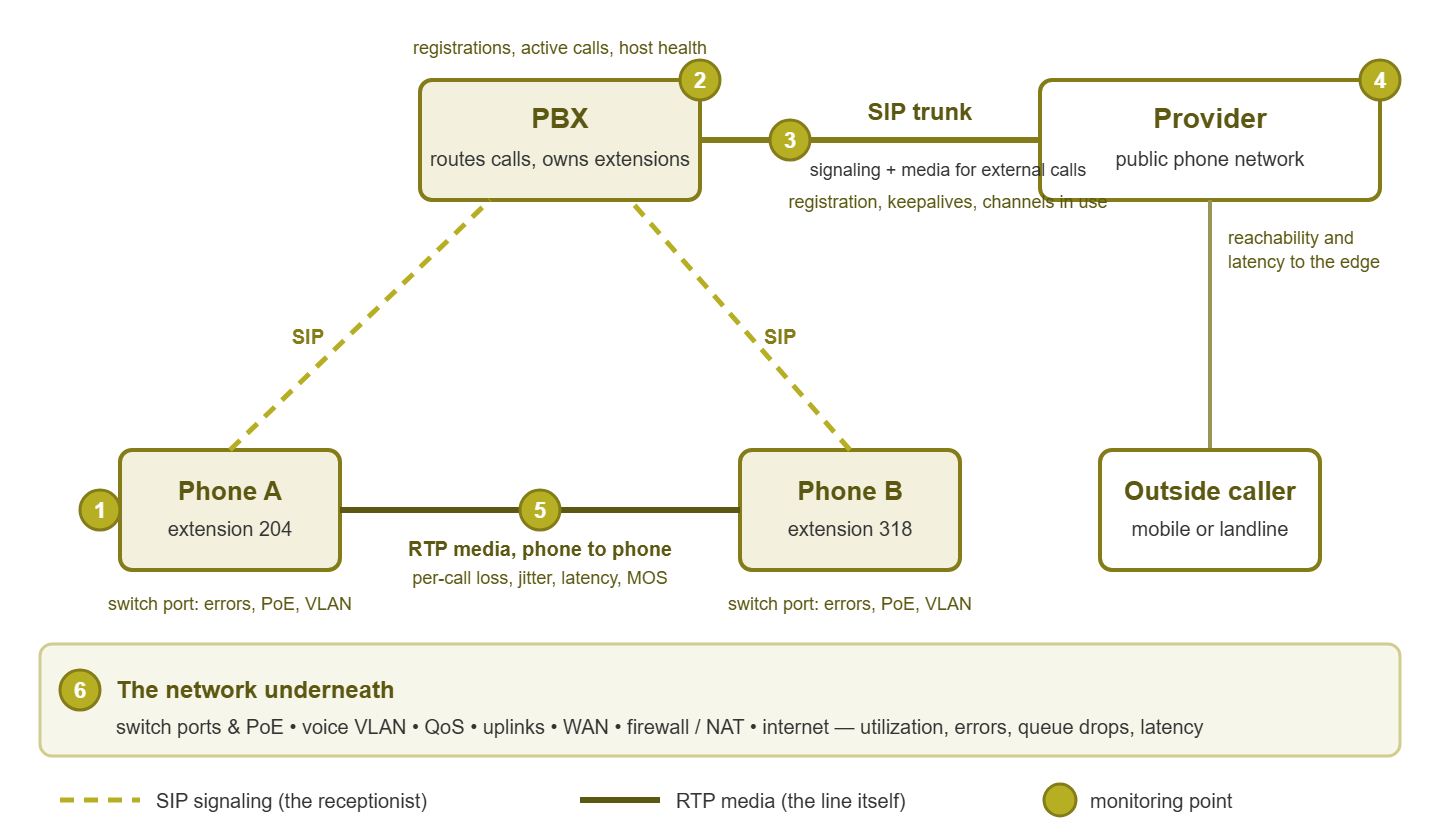
Figure 1: Signaling goes through the PBX; media goes phone to phone for internal calls and out over the trunk for external ones. The numbered points are where monitoring attaches.
Why they take different paths and fail differently
Here is the part that surprises most newcomers: the two conversations do not travel the same route. Signaling always goes through the phone system — the PBX (Private Branch Exchange). This is the switchboard computer that owns the extensions. Signaling goes through it because the PBX is the one that knows where everyone is. But once the call is connected, the media usually flows directly between the two phones, ignoring the PBX entirely. The PBX only hears about the call again when somebody hangs up.
For a call to the outside world, media cannot go direct. It flows through the PBX (or a border device in front of it) and out over a trunk to the provider. So the same phone can have a flawless internal call and a terrible external one, because the media took a different path. That is the fastest diagnostic split in voice troubleshooting, and the isolation guide in this topic is built around it.
Different paths mean different failure symptoms, and learning to read the symptom tells you which conversation broke:
- Signaling problems. The phone shows "unregistered" or "no service." Calls do not ring. A call connects and then drops after exactly the same number of seconds every time. That is the classic signature of a firewall quietly forgetting the session mid-call. The PBX, and everything between the phone and the PBX, are the suspects.
- Media problems. The call connects and stays connected, but the audio is choppy, robotic, delayed, or missing in one direction. Now the suspects are everything on the media path — which, remember, may not include the PBX at all.
One-way audio ("I can hear you, but you can't hear me") deserves a special mention because it is so confusing the first time. Signaling worked, so the call is up; media works one way, so nothing is "down." Almost always, a firewall or NAT (Network Address Translation) let the SIP through but blocked the RTP in one direction. NAT is the device that rewrites private addresses to public ones. The receptionist connected you; one of the two wires was never plugged in.
A late packet is a lost packet
Most traffic on your network uses TCP, which guarantees delivery: if a packet goes missing, the receiver asks for it again and the sender resends it. Email, web pages, file copies — all of them wait for the retransmission, and nobody notices the wait.
Voice cannot do this. RTP packets are played out as they arrive, on a strict schedule. Consider the packet carrying the slice of audio from 0.400 to 0.420 seconds into the call. If it has not arrived by the time the phone needs it, the phone plays something else. It plays silence, or a guess based on the previous packet, and moves on. If the missing packet turns up later, it is useless; that moment of the conversation has already happened. This is why voice rides on UDP, which never retransmits, and why a late packet is exactly as bad as a lost one.
Phones do have one trick: the jitter buffer, a small holding area that collects a few packets before playing them. That way, small variations in arrival time are smoothed out. But every millisecond spent in the buffer is a millisecond of added delay, so buffers are kept short. That tradeoff is why the jitter number matters so much.
This one fact explains most of what makes voice different to monitor. A network that is "fine" for everything else, because everything else quietly retransmits, can be genuinely broken for voice. Loss you never saw in a file copy shows up as a crackle in the managing director's ear.
The four numbers: loss, jitter, latency, and a quality score
Every call-quality tool, phone statistics page, and provider ticket revolves around four numbers. Here is what they mean, and roughly where trouble begins.
Packet loss
The share of RTP packets that never arrived, or arrived too late to use. Phones conceal isolated losses well, but on real networks losses come in bursts, and a burst becomes an audible dropout or a vanished syllable. A common rule of thumb: loss approaching one percent is worth investigating, and a few percent is plainly audible. Compressed codecs are less forgiving than uncompressed ones.
Jitter
The variation in arrival spacing. Packets leave the sender every 20 ms; if they arrive with gaps of 15, 25, 40, and then 5 ms, that is jitter. The jitter buffer absorbs modest amounts; beyond its capacity, packets are discarded and you get the same audible damage as loss. Jitter is caused by queuing — voice packets waiting behind other traffic — so it usually signals congestion on the path. The full story lives in Jitter Explained; for now, treat sustained jitter of more than a few tens of milliseconds as a warning sign.
Latency
The one-way delay from mouth to ear. Below roughly 150 ms one way, conversation feels natural. As it climbs, people start talking over each other and saying "sorry, go ahead." As latency climbs, any echo in the system becomes noticeable because the reflection arrives late enough to hear as a separate sound. Latency comes from distance (the speed of light is not negotiable). It also comes from every device that buffers the packet along the way, and from the jitter buffer itself. Tools often report round-trip time instead, which is roughly double.
A quality score
Loss, jitter, and latency are three separate numbers, and users experience their combination. The industry's answer is MOS (Mean Opinion Score). This is a number from 1 (dreadful) to 5 (perfect) that summarizes how a call would sound to a listener. The MOS Scores guide explains how phones and tools compute it from loss, jitter, and delay using a standard model rather than actual listeners. For monitoring, MOS is the number to trend per site and per trunk; the three raw numbers explain why it moved.
Here is how the four numbers look on a typical phone's statistics page, for the stream it received:
Call statistics (receive side)
  Codec:              uncompressed, 20 ms packets
  Packets received:   14,882
  Packets lost:       31        (0.2%)
  Jitter (avg / max): 4 ms / 38 ms
  Round-trip delay:   62 ms
  MOS (listening):    4.2
Read it the way a mechanic reads a gauge cluster. Loss of 0.2 percent is fine. A maximum jitter of 38 ms against an average of 4 means one brief congestion event. A 62 ms round trip is a healthy nearby call, and the MOS of 4.2 agrees that the listener would have been happy. Had the readout shown 3 percent loss and 90 ms average jitter, the MOS would sink into the threes and the user would already be walking to your desk.
Tip: whenever you read these numbers, ask "measured where, and in which direction?" A phone reports the stream it received; the other phone reports the opposite direction. Clean numbers on your side with loss on the far side means the damage is on the path away from you. Direction is half the diagnosis, and the half people forget.
The parts of a voice system
Before deciding what to monitor, name the parts. Most voice systems, large or small, hosted or on-premises, break down into the same four layers.
Handsets and softphones
Desk phones (usually powered by the switch over PoE, Power over Ethernet), softphones (a phone as software on a laptop), and conference-room devices. Each registers to the phone system, sends and receives RTP, and — usefully — measures the stream it receives.
The PBX or hosted PBX
The brain: a server or appliance in your rack that holds the extensions, routes calls, plays voicemail, and manages the trunks. A hosted PBX moves that brain to a provider's data center, and your phones register across the internet instead. The monitoring changes — you cannot check a hosted PBX's CPU — but the phones, the trunks, and the network are still yours to watch. A related piece is the session border controller (SBC), a specialized firewall for voice that handles NAT and security for calls crossing the edge. Smaller deployments let the PBX or the ordinary firewall do that job, with mixed results.
Trunks to the outside world
A trunk is the phone system's connection to the public telephone network. Older trunks were physical lines. The modern one is a SIP trunk, a logical connection to a provider over the internet or a dedicated circuit, with a fixed number of simultaneous calls. Every external call passes through a trunk, which makes trunk health its own subject, covered in SIP Trunk Health.
The network under everything
This includes switches with PoE budgets and a voice VLAN, a separate virtual network for phones, away from the chatter of PCs. It includes QoS (Quality of Service), the rules that let voice packets jump the queue. The guide QoS for Real-Time Traffic covers the specifics. There are WAN links between sites, the firewall at the edge, and the internet connection to the provider or the hosted PBX. Nothing in the voice system works without this layer, and it is where most of the trouble originates.
What to monitor at each part
The table below is the practical heart of this guide. Pay attention to the last column: it says where each piece of data comes from, which decides what you can monitor with the tools you already have.
| Part | What goes wrong | What to monitor | Where the data comes from |
|---|---|---|---|
| Handsets and softphones | Unregistered, no power, wrong VLAN, stale configuration, a misbehaving PC daisy-chained behind the phone | Registration state per phone; PoE state on its switch port; the phone's own receive-side loss and jitter | PBX registration list; the switch over SNMP; the phone's statistics page or RTCP reports |
| PBX (on-premises) | Service stops; CPU, memory, or disk exhaustion; license limits; certificate expiry | Service up; CPU, memory, disk; registered-phone count; active calls; trunk states; error logs | SNMP, WMI, or SSH on the server; the PBX's own status output; syslog |
| Hosted PBX | Provider outage; registration path blocked; internet trouble at your edge | Reachability and latency to the service; count of registered phones; synthetic test calls | Probes from each site; the provider's status reports; your own phones |
| Trunks | Deregistration, keepalive failures, all channels busy, a rising rate of failed calls | Registration and keepalive state; channels in use against the ceiling; call-failure rate by class; latency to the provider's edge | PBX trunk status; call detail records; probes toward the provider |
| LAN: switches and the voice VLAN | Port errors, PoE budget exhausted, uplink saturation, spanning-tree changes, QoS not applied | Interface errors and discards; PoE headroom; uplink utilization; QoS queue drops | SNMP on the switches |
| WAN and internet edge | Congestion, latency spikes, loss, routing changes, firewall session-table limits | Utilization per link; latency, jitter, and loss between sites and to the provider; firewall session count | SNMP on routers and firewalls; synthetic probes |
| The media path, end to end | Any of the above, as heard from the user's chair | Per-call loss, jitter, latency, and MOS; synthetic voice probe results | Call quality records; phone statistics; probes between sites |
Notice the pattern in that last column. Most of it is ordinary network monitoring: SNMP on switches and routers, host checks on a server, probes between sites. The voice-specific additions are three things: registration state, trunk state, and per-call quality records. There is also the discipline of watching error counters and utilization on the exact paths the phones use. The call-quality program guide turns those additions into a routine.
Most phone problems are network problems
Here is the honest reality, and it will save you many arguments. Voice packets cross the same switches, uplinks, and WAN links as everything else. They are simply the first to suffer when something goes wrong, because they cannot wait and cannot be resent. The phones are the canary in the coal mine: sensitive, loud, and not actually the cause of the gas.
Consider the everyday cases. A duplex mismatch on the receptionist's switch port drops a fraction of packets in one direction. Every file copy on that port quietly retransmits, and only the phone sounds broken. An uplink saturates for two minutes each morning when overnight backups overlap with people arriving. The phones on that floor sound underwater for exactly two minutes and nobody can reproduce it. A WAN link carries a small, steady loss that TCP has hidden for months, until the branch office complains about calls to head office. In every case the ticket said "phones," and the fix was on the network.
That reality cuts both ways. "It's the network" is only useful when you can say which part — a switch port, an uplink, a WAN link, the provider's edge. The isolation guide gets you from vague to specific. And sometimes it genuinely is the phone system: a certificate expired, licenses ran out, a PBX process leaked memory. Monitoring both layers is what lets you tell the difference in minutes instead of meetings.
A starter monitoring list
If you are building voice monitoring from nothing, this sequence pays off soonest.
- 1. Registration count. The number of registered phones per site, from the PBX; alert when it drops sharply. It is the best single "is the phone system working" number. The registration and provisioning guide explains everything that has to go right for a phone to register.
- 2. Trunk state. Registration or keepalive status of every trunk, plus channels in use against the ceiling. When this fails, the outside world disappears.
- 3. Switch ports carrying phones. Errors, discards, and PoE state per port; alert on error counters that keep growing rather than on any single value.
- 4. Uplinks and WAN links. Utilization, and QoS queue drops where the device exposes them. This is where the two-minute morning mystery lives.
- 5. Latency, jitter, and loss between sites and to the provider's edge. Continuous small probes, so you have history when a complaint arrives.
- 6. Per-call quality records. MOS, loss, and jitter per call from the PBX or phones; review the worst calls weekly.
- 7. The PBX host. Service state, CPU, memory, disk, and certificate expiry, as for any other important server.
Five of the seven items are plain network monitoring. That is not a coincidence; it is the whole point of this guide.
Where to go next
You now have the mental model the rest of this topic builds on. A call is two conversations. SIP sets it up like a receptionist and RTP carries the voice like the line itself. They travel different paths and fail in different ways. Voice cannot retransmit, so a late packet is a lost packet. Four numbers describe quality. Each part of the voice system has a short list of things to watch. Most are ordinary network monitoring pointed at the right places.
From here, continue with the trunk guide. Continue with the program guide for turning call records and probes into a routine. Continue with the isolation playbook for proving where a bad call lived. And continue with the registration guide for the mornings when phones will not come up at all. All of them live in VoIP & Call-Quality Monitoring.
Put this into practice with SysPeep Monitor
Most of what this guide told you to watch is exactly what SysPeep Monitor collects over SNMP, WMI, and SSH. That includes switch ports and PoE, uplinks, WAN latency and loss, and the server behind the PBX. SysPeep Monitor puts the data on one dashboard, with thresholds and dependencies designed to keep the noise down. Watch the network under your phones before the phones notice. The free trial installs on a Windows machine in minutes.
Download Free TrialLearn About SysPeep - All Rights Reserved.