
Monitoring Your Website from the Outside: Multi-Location Checks
Your dashboard is green. The web server answers pings, the service is running, the CPU is bored. Then the phone rings: "Your website is down." Both statements are true at once, and that contradiction is the subject of this guide. A public website has two audiences — the people inside your network and everybody else. They do not take the same road to reach it. If you only watch the road you drive yourself, you will be the last to learn the public one is closed.
This guide is about watching a public site the way the public experiences it. That means from outside, from more than one place, with checks that go beyond "did a port answer." By the end you will know why internal checks lie about public sites. You will know how many outside vantage points you need and where. You will learn how to tell one location's bad afternoon from a real outage, and which check types catch which failures. And you will know how to arrange the checks so they wake you only for real problems.
In this guide
- Why the view from inside lies
- The road an outsider actually takes
- How many vantage points, and where
- Reading the pattern: one location versus all of them
- Check types from simple to strict
- Confirmation logic: earning the right to wake someone
- How often to check
- Running your own checker versus using a service
- Where to go next
Why the view from inside lies
An internal check is any test of your website that runs from inside your own network. That could be the monitoring server in the datacenter, a script on the web host, or you opening the site from your desk. Internal checks are honest about the server. They are not honest about the site, because a site is the server plus everything between it and a stranger's browser. Four things make the inside view misleading.
Split-horizon DNS
Many networks run split-horizon DNS: the same name resolves to a private address inside the building and a public address outside it. Inside, www.example.com becomes 10.20.0.15; outside, it becomes the public address on your firewall. Your internal check tests the private answer. The public record — the one that matters to customers — can be wrong, stale, deleted, or pointing at a host you decommissioned last month. And the internal check will never notice.
Internal routes
Traffic from your monitoring server to your web server crosses one switch, maybe a router. It never touches the internet link, the border router, the firewall's public rule set, the address translation, or the edge devices in front of the site. A customer's request crosses all of those.
Cached content
Corporate proxies, browser caches, and edge caches can serve a copy of your page long after the real server has stopped producing it. The reverse is also true: your check may hit the origin server directly while customers hit a caching layer serving errors or an old version. Either way, the two audiences are looking at different pages.
The firewall path
Outsiders enter through one specific firewall rule: allow the web ports from the internet to the site. A change to that rule will break the site for the world. So will a certificate that only fails on the public listener, or a rate limiter that starts refusing strangers. Meanwhile, the internal path, which uses a different rule, keeps working perfectly.
There is a fifth, quieter reason. The internal check shares power, switches, and internet connection with the server it watches. When the building's uplink drops, the check keeps passing while the site vanishes from the world. A check that shares fate with its target cannot report the failures that take both down together.
The road an outsider actually takes
To see what an external check covers, walk the path a customer's request takes. It is longer than most people expect.
- Public DNS. The customer's resolver asks your public name servers for the address. A wrong record, a lapsed domain, or unreachable name servers end the journey here.
- The internet. Packets cross the customer's provider, several intermediate networks, and yours. A routing problem in any of them can make you unreachable from one region while the rest of the world is fine.
- Your border. The internet link, the border router, and the firewall's public rules: home of blocked ports, exhausted address-translation tables, and saturated links.
- The edge layer. Whatever sits in front of the server: a reverse proxy, a load balancer, a web application firewall, or a content delivery network (servers that hold copies of your content close to users). Each can say no on your behalf.
- The server and application. The web server software, the application code, and the database behind it.
An internal check enters this road at the last step. An external check drives its whole length. That is the argument for external monitoring in one sentence, and the figure below shows what it looks like when the two disagree.
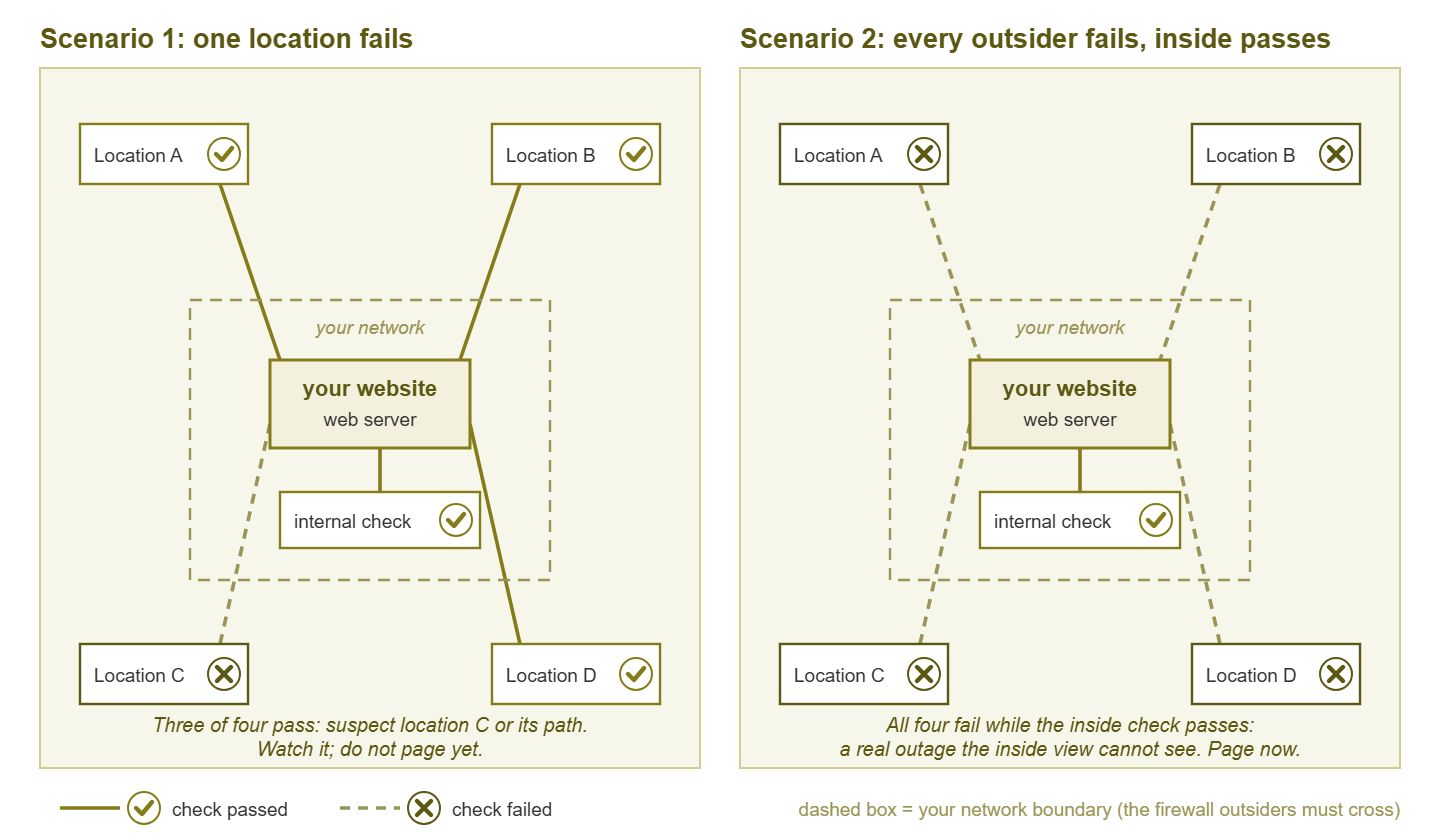
Figure 1: One outsider failing is that location's problem; every outsider failing while the inside check passes is a real outage that the inside view cannot see.
How many vantage points, and where
A vantage point is a place an external check runs from: a small host in another network, or one of the locations a checking service offers. One vantage point is far better than none, but it has a flaw. When it reports a failure, you cannot tell whether the site is down or the vantage point is having a bad day. Two let you tell those apart. Three let you be confident when one disagrees. Beyond four or five, a site hosted in one place gains little from more locations; you are mostly measuring the internet, not your site.
Where matters more than how many. Put vantage points near your customers, not everywhere. If your customers are in one country, check from that country through two or three different providers. A check from the far side of the planet mainly measures the planet. It will be slow, and it will flap for reasons that have nothing to do with you. Add a distant location only if you serve distant customers, and judge it by a looser standard.
Diversity beats quantity. Two vantage points in the same datacenter, on the same provider, using the same DNS resolver, will see the same outages and miss the same ones. Aim for different providers, different networks, and where you can, different resolvers. If many of your users arrive on phones, a vantage point behind a mobile carrier's network is worth having. Carrier networks behave differently from office lines: more address translation, more caching, more latency.
Tip: Behind a global edge network, each vantage point talks to a different edge node. In that setup, the pattern of results across locations doubles as a map of that network's health. A failure from one region with success elsewhere is often that region's edge node, not your origin server.
One more placement rule: never check from a network your firewall treats specially. If the office address range is on an allow list, a check from the office is not an outside check.
Reading the pattern: one location versus all of them
Multiple vantage points earn their keep by producing a pattern rather than a single verdict. Reading the pattern is the skill this guide is really teaching. The table covers the shapes you will see most often.
| Pattern | Most likely meaning | What to do |
|---|---|---|
| One location fails, the rest pass | A problem at that vantage point or its path: its provider, regional routing, or the checker host itself | Do not page. Watch it; if it persists, investigate reachability from that region |
| Most locations fail, one passes | Real outage; the passing location is probably served from a cache or a healthy edge node | Page. Treat as down |
| All outside locations fail, the internal check passes | Outage in the public path: DNS, the border, the firewall rule, the internet link, or the edge layer | Page. Start troubleshooting from the outside in |
| All outside locations fail, the internal check fails too | The server or application itself | Page. Start at the server |
| Everything passes, everything is slow | Degradation, not outage: an overloaded server, a saturated link, a slow dependency | Alert at a lower severity; see the guide on response-time budgets |
| Locations flap in and out, no two at once | An overloaded server dropping some connections, a flaky link, or a DNS record that resolves inconsistently | Confirm before alerting; look for a resource near its limit |
One honest caveat about the first row. If the single failing location is where most of your customers are, it is a real outage for them, even though your site is technically up. Whether that counts as "down" is a definition to settle in advance. The guide on defining what "down" means walks through making that call.
Check types from simple to strict
"Check the website" can mean many different tests, and they form a ladder. Each rung proves more and costs a little more to run. A good external monitor uses several rungs at once, because each catches failures the rung below cannot see.
| Check type | What it proves | What it misses |
|---|---|---|
| Ping (ICMP echo) | The address is reachable | Nearly everything; many hosts and edges do not answer pings at all |
| TCP port connect | Something is listening on the web port | Whether the listener is your site, whether it works, whether the certificate is valid |
| HTTP status code | The server produced a response and it was not an error code | A "successful" page that is actually a blank template, a maintenance page, or the wrong site |
| Content or keyword match | The page contains a string that only appears when it is healthy, and does not contain an error string | Broken parts of the page that the chosen string does not cover |
| Redirect chain sanity | The plain-HTTP and alternate hostnames redirect where they should, in one or two hops, ending at the expected address | Problems on the destination page itself |
| Transaction check | A whole flow works: log in, search, add to cart | Little, but it is the most fragile check and needs the most care |
A TCP connect check is the cheapest test worth running and a fine early-warning tripwire. But on its own it will happily report "up" while the application returns error pages. An HTTP status check should be told whether to follow redirects. One that follows every redirect will call a broken site "up" if it lands on a friendly error page that returns a success code. For a content match, pick a string near the bottom of the page that depends on the application working. A footer element rendered by the template is one example. Choose that kind of string rather than the page title, which is the first thing to load and the last to break. Add a negative match too: if "database error" appears anywhere in the body, that is a failure regardless of the status code.
Redirect checks deserve their own line because redirects fail silently. A site whose bare hostname stopped redirecting to the www version, or whose plain-HTTP address now loops, is broken for everyone who typed the address from memory. And no status check on the final page will tell you. Give each entry hostname its own check and assert where it ends and how many hops it took. The guide on monitoring what customers actually touch covers which pages and flows deserve the stricter rungs.
Confirmation logic: earning the right to wake someone
The internet is noisy. A single request from a single place will fail now and then for reasons that vanish before you can look. Those reasons might be a dropped packet, a resolver hiccup, a checker host that was briefly busy. If every one of those pages the on-call person, they will stop trusting the pages. In that case, a real outage will be ignored along with the noise. Confirmation logic is the set of rules that turns raw check results into an alert you can trust.
The core rule is simple: require failures from two or more locations before alerting. A single-location failure is information; a multi-location failure is an incident. Around that rule, a sensible sequence looks like this:
- Step 1: retry from the same place. When a check fails at location A, re-run it from A after a short pause, typically ten to thirty seconds. Most one-off failures disappear here.
- Step 2: ask the others. If A still fails, trigger immediate checks from B and C rather than waiting for their next scheduled run.
- Step 3: count. If the required number of locations agree, open the incident and notify. If not, record A's failure as a low-severity event and keep watching.
- Step 4: clear carefully. Do not declare recovery on the first success either. Require the same number of locations to pass, so a flapping site does not generate a fresh page every minute.
This is the same idea as requiring several consecutive readings before a threshold alert fires. And the guide on hysteresis and confirmation covers the general technique. For web checks, scale the required count to how many vantage points you have: with two, require both; with five, two or three is plenty. The honest cost of confirmation is delay: retry, cross-check, and counting can add a minute or two to detection. That is a fair price for alerts people believe, but make it a conscious choice and put it in your outage math.
Use severity levels rather than a single alarm: one location failing for a long stretch opens a ticket for the morning; two or more failing is a page. The pattern table above is, in effect, your alert routing policy.
How often to check
Check frequency is a trade between how fast you learn about an outage and what you pay for the privilege. You pay in load on your site and in cost or resources for the checker. The table gives sensible starting points.
| Interval | Good for | Cost and caveats |
|---|---|---|
| Every 15 to 30 seconds | A handful of critical endpoints on a site with a strict availability target | Real load if applied to many pages; more noise to confirm away; costs more with a service |
| Every minute | The home page, login, checkout, and the main API endpoints | The usual default for anything customers would notice within minutes |
| Every five minutes | Secondary pages, documentation, marketing content | Fine for pages where a few minutes of blindness is acceptable |
| Every fifteen minutes or longer | Content-match checks on rarely changing pages, redirect checks, certificate details | Cheap and quiet; not an outage detector |
Do the detection arithmetic once and write it down: time to detect is roughly the interval plus the confirmation delay. If you check every five minutes and confirm for two more, an outage can run seven minutes before anyone knows. That time counts against your availability target. The guide on the nines shows how quickly minutes add up against those targets. Do the load arithmetic too: five locations times twenty URLs every minute is a hundred requests a minute. That is nothing for most sites but not nothing for a heavy page that renders a report on every hit. Point frequent checks at light pages and reserve heavy pages for less frequent, stricter checks.
Two housekeeping items save later confusion. Give your checks a distinctive user-agent string so you can filter them out of analytics; nobody enjoys explaining why the busiest "visitor" is the monitor. And prefer a normal request over a header-only request, because some servers handle header-only requests through a different path. A check that succeeds on a path customers never use proves less than it seems.
Running your own checker versus using a service
You can build an external vantage point yourself. This could be a small host in a second office, or a modest machine at a hosting provider on a different network from your site. It runs a scheduled script or a monitoring probe. Or you can subscribe to a checking service with locations around the world.
Your own checker
You control everything: which checks, how often, what counts as failure, where the results go. There is no charge per check and no third party holding your list of endpoints. The costs are quieter. One checker is one vantage point, so you need at least two to read patterns. And you must monitor the monitor: a checker that dies silently produces no alerts, and no alerts look exactly like a healthy site. Give every self-run checker a heartbeat, a regular "I am alive" signal that something else watches for, so its silence is itself an alarm.
A checking service
You get many locations, built-in confirmation logic, and someone else maintaining the fleet. You pay per check or per location and depend on the service's own availability. Its checks arrive from published address ranges your firewall and rate limiter must know about. The location diversity is hard to match on your own.
The common answer: both
Most mature setups end up layered. An external service, or a couple of self-run remote hosts, answers "is it down for the world?" from several places. A probe you control, at a second site, runs the richer checks that need your own logic. And internal monitoring of the servers, links, and services answers "why?" the moment the outside says something is wrong. The outside-in view finds the outage; the inside view finds the cause. Route all of it into one alerting system; an external check that alerts into an inbox nobody watches is an expensive way to feel safe. Designing the probe itself — what it requests, how it judges success, how it avoids becoming load — is covered in the guide on designing synthetic probes.
Where to go next
The lesson of this guide fits on a sticky note. A public site must be checked from outside, from more than one place. The checks must be strict enough to notice a page that loads but does not work. Internal monitoring is not wrong; it answers a different question. Pair the two, read the pattern across locations instead of reacting to a single verdict, and require agreement before you wake anyone. Do that and the call that starts "your website is down" becomes a call you already made.
Three guides in this topic build directly on this one. DNS, TLS, HTTP: the layers of a single web check takes one external check apart so you can see which stage failed. Response-time budgets turns "slow" into something you can alert on. And the ten-minute triage sequence is what to do once the outside says it is really down. All of them live in the Website & Web-Service Uptime Monitoring topic.
Put this into practice with SysPeep Monitor
Outside-in checks tell you the site is down; the harder question is why. The monitor watches the servers, firewalls, links, and services behind your site from one Windows machine. It has lightweight remote probes for other sites. Its dependency-aware alerting points at the layer that actually failed. Pair it with your external checks and the free trial will show you the inside of the next outage.
Download Free TrialLearn About SysPeep - All Rights Reserved.