
The Monitoring Skill Ladder: From Reading Graphs to Designing Systems
Somewhere in your organisation there is a person everyone turns to when something breaks. It is usually not the person with the most certificates on the wall. It is the person who can open a graph and say "it started at 14:07, it is the file server, and here is why". That ability can be learned in an order, and this guide is the order.
Monitoring skill is hard to see from the outside. A monitoring configuration looks the same whether its builder understood the network or clicked "add all devices" and went to lunch. The difference shows up later, at three in the morning, in whether the alert was worth waking up for. So the people who have the skill are often not recognised for it. And the people who want it are often not sure what "it" is.
By the end of this guide you will be able to place yourself on a five-rung ladder, from reading graphs to designing the whole practice. You will be able to say plainly what you can and cannot yet do. You will also be able to fill in a self-assessment you could hand to a manager and pick the one project that moves you up. You will also know why a solo administrator usually stands on three rungs at once.
In this guide
- Why monitoring is a skill multiplier
- The five rungs
- Rungs are not job titles
- The self-assessment table
- One project per rung
- A year at Meridian Parts
- The ladder checklist
- Where to go next
Why monitoring is a skill multiplier
Monitoring is how you prove things, and the person who can prove things is the person who gets listened to. When the sales director says the network is slow, the administrator without monitoring has an opinion. The administrator with monitoring has a graph with a timestamp on it. Both may be right. Only one of them ends the meeting.
Every other IT skill is worth more when you can show its result. You can configure a switch, but with monitoring you can show that the uplink stopped dropping packets after you did. Without evidence, good work is indistinguishable from luck, and management is not wrong to treat it that way. (They have been told "it's fixed now" before.)
A skill multiplier is a skill that raises the value of the skills you already have. Monitoring does this because it turns "I think" into "I can show you". Learning to design a check makes you a better system designer, because you have to say what "working" means before you can test for it. That question, "what does working mean for this service?", is the whole discipline, and the ladder is five increasingly ambitious answers to it.
The five rungs
Each rung is defined by what you can do rather than what you know. That is because knowledge is easy to overstate and ability shows up when a thing breaks. For each rung I give what a person there can do and what they typically cannot yet. I also give a concrete test you can run on yourself this week. Be honest with the tests. Nobody else is marking them.
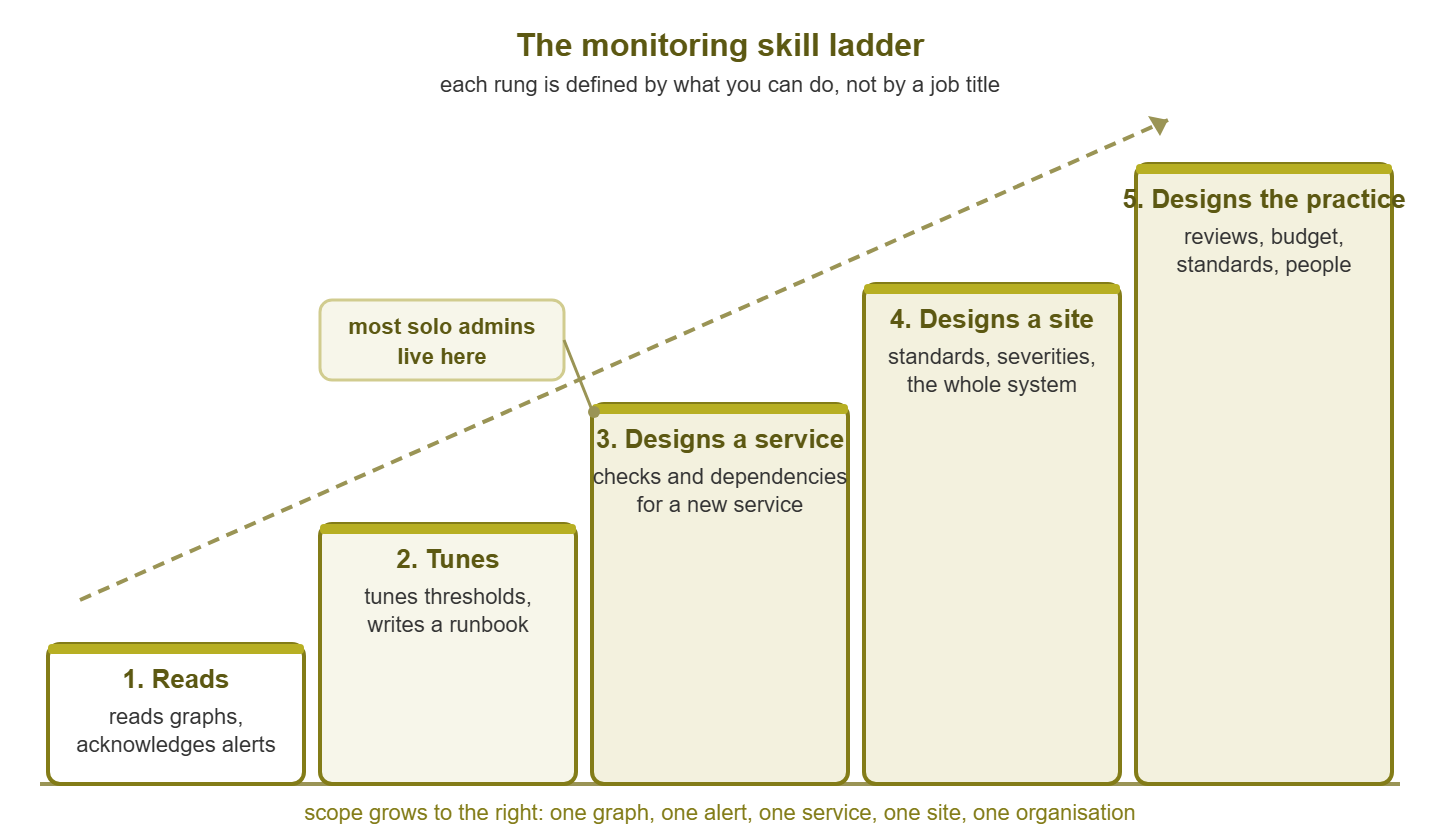
Figure 1: The five rungs of monitoring skill. Each rung is defined by what you can do, not by a title. Most solo administrators stand on rungs two, three, and four at once.
Rung one: reads graphs and acknowledges alerts
A person at rung one can look at a graph and say what it shows. That sounds small. It is not. It means knowing that the line is bandwidth and not packets. You know that the flat stretch at the weekend is normal and the spike on Tuesday is not. You know that the gap at midnight is the collector restarting rather than the switch dying. It also means being able to acknowledge an alert. That is telling the monitoring system "a human has seen this", so that it stops re-notifying and colleagues know it is being handled.
What they cannot yet do is change anything with confidence. They will not adjust a threshold, the value at which a metric becomes an alert, because they do not yet know what a safe value is. They escalate rather than diagnose, which is correct at this rung; a team that punishes it gets rung-one people who guess instead.
The test: open the graph for your busiest link and, without reading any labels, describe the last seven days in four sentences. Then read the labels. If your four sentences survive, you are at rung one. The network visibility mental model is the fastest way to get here if you are not yet.
Rung two: tunes thresholds and writes a runbook
A person at rung two can change what the monitoring system does and make it better. They can look at an alert that fires every night at two and decide what is wrong. Is it the threshold, the timing, or should the alert not exist? They can write a runbook, a short document that says what to do when a specific alert fires. They write it well enough that a colleague at rung one can follow it at three in the morning. Runbooks as training describes what a good one teaches beyond the steps.
What they cannot yet do is build monitoring for something new. Hand them an unmonitored service and they will add a ping check and a CPU graph, because those are the checks they have seen. They tune what exists. They do not yet ask what the service needs.
The test: pick the noisiest alert in your system, the one that has fired most often in the last month. Fix it so that it fires only when a human needs to act, and write down why you chose the new value. If you can do that without asking anyone, and the alert stays quiet without missing a real fault, you are at rung two. There is a query for finding the noisiest alert further down.
Rung three: designs checks and dependencies for a new service
A person at rung three can be handed a service they have never seen and produce a monitoring design for it. They ask what the service is for, what "working" means from the user's chair, and what it depends on. From those answers they choose checks. A check is one test the monitoring system runs on a schedule, such as "can I fetch this page in under two seconds?". They set dependencies. These tell the system that when the switch in front of a service is down, the twelve alerts behind it should collapse into one. And when no built-in check fits, they write one; the anatomy of a custom check covers the shape.
What they cannot yet do is make this consistent across a whole site. Their designs are good for one service and different for the next. When there are forty services the monitoring system looks like forty people built it. This is the rung most experienced administrators reach and stay on, and a great deal of good work is done here.
The test: take a service that has only a ping check. Write, on one page, what it depends on and what its users would notice first if it failed. Include the three checks that would catch that before the users do. Implement them. If the first real fault is caught by one of your checks and not by a user, you are at rung three.
Rung four: designs the monitoring system for a site or an organisation
A person at rung four designs monitoring as a system rather than as a pile of checks. They decide the naming convention, what each severity means, and what gets a page and what gets an email. They decide whether remote sites get their own probe and how long data is kept. They also decide what a new device must have before anyone may call it "monitored". They write these down as standards, so that forty services look as if one person designed them even when four people did. Increasingly they treat the configuration as something to be versioned and reproduced rather than clicked; what monitoring as code means is the plain-language introduction.
What they cannot yet do, or have not yet had to, is make the system survive them. It is coherent because they are coherent. When they leave, the standards start to drift within a quarter, because nobody else was ever asked to own them.
The test: write the standard for onboarding a new device into monitoring and hand it to someone at rung two. If they onboard a device to your standard without asking you anything, you are at rung four. If they had to ask three questions, the standard was in your head, which is where most standards live.
Rung five: designs the practice
A person at rung five designs how monitoring is done by people, not only how it is configured. They decide who reviews alerts and how often, who may add a check, and what the budget is and what it buys. They also decide how the on-call rotation is staffed and how new people are trained. Their output is not a configuration. It is a set of habits, meetings, documents, and decisions that keep the configuration good after they have moved on. Monitoring and the bus factor is the group of guides about exactly that.
What they typically cannot do is anything at rung one faster than the rung-one person. The ladder measures scope, not speed. The person who designed the practice is often the slowest in the room at reading a specific graph, because they have not read one in a while.
The test: leave for two weeks. If the alert review happened and the new device was onboarded to standard without you, the practice exists. If your phone rang, it does not yet.
Rungs are not job titles
The rungs describe abilities, job titles describe reporting lines, and the two only loosely agree. I have met senior engineers who were solidly at rung two. I have met junior administrators who were designing dependency trees for the whole site because nobody else would. Your title tells you what the organisation currently thinks you do. The ladder tells you what you can do. When they disagree, the ladder is usually right and the title usually catches up, though never on a schedule you control.
A solo administrator usually straddles three rungs at once. If you are the only IT person in the building, you acknowledge the alerts, tune the thresholds, and design monitoring for every new system. In that situation, you are also the de facto author of every standard, because you are the only person applying them. What you almost never get to do is rung five, because a practice needs more than one person to practise it. That is a gap in your headcount, not your skill, and when to get help is about telling the two apart.
The honest use of the ladder is to find the lowest rung where your evidence runs out. Most people, asked where they are, name the highest rung they have ever touched. Ask instead: which rung could I demonstrate tomorrow to a sceptical stranger? That rung is where you are. (The stranger is imaginary. The gap is not.)
The self-assessment table
The self-assessment is a table with one row per rung, built around evidence rather than confidence. For each rung you write the can-do statements in your own words, the evidence you have, and the evidence you lack. Evidence means a thing you could show someone. Examples include a runbook you wrote, an alert you fixed with the before-and-after history, a design document, a standard, and a review that happened while you were away. The table is also the seed of a portfolio, which building a monitoring portfolio turns into something you can put in front of an interviewer. The rows below are one person's honest answers, filled in as an example.
| Rung | Can-do statements | Evidence I have | Evidence I lack |
|---|---|---|---|
| 1. Reads graphs and acknowledges alerts | I can describe a week of any graph without its labels. I acknowledge alerts and hand over cleanly at shift end. | Handled the alert queue for a month; handover notes from that month. | None at this rung. |
| 2. Tunes thresholds and writes a runbook | I can find the noisiest alert, fix it, and say why. I can write a runbook a colleague follows unaided. | Fixed the backup-window disk alert; alert history before and after. | No runbook I wrote has been used by anyone but me. |
| 3. Designs checks and dependencies for a new service | I can take an unfamiliar service and produce checks, thresholds, and dependencies from what it needs. | One-page design for the print service; first fault caught by my check, not a user. | Have not written a custom check. |
| 4. Designs the monitoring system for a site | I can write standards that other people follow without asking me. | Naming standard, written and published. | Nobody else has onboarded a device from it yet. |
| 5. Designs the practice | Reviews, onboarding, budget, and training happen without me. | None yet. | Everything at this rung. |
The example shows the typical shape: solid at the bottom, thinning towards the top. There is a clear "next" at the first row where the fourth column is longer than the third. The fourth column is a to-do list, not a confession.
One project per rung
You move up one rung by finishing one project that belongs to the rung above. Reading tells you what the rung looks like. The project produces the evidence. Here is one project per rung. Each is small enough to finish in a few weeks alongside the day job and large enough to prove the rung.
- From rung one to two: own the noisiest alert. Find the alert that fired most in the last month, work out why, fix it, and write the runbook for the version that remains. Keep the alert history from before and after; that is the evidence.
- From rung two to three: own one service end to end. Pick a service with thin monitoring, write the one-page design, implement the checks and dependencies, and wait for the first real fault. The first thirty days monitoring plan is the same shape at the scale of a whole network.
- From rung three to four: write one standard and get it used. The device onboarding standard is the best first one, because devices arrive constantly and every arrival tests it. It is done when someone else has followed it without asking you anything.
- From rung four to five: run one review that happens without you. Set up the monthly alert review with a written agenda, run it twice, hand it over, and stay away. It is done when the third one happens and you read the notes afterwards.
- At rung five: teach the ladder. Take someone at rung one through their first project. A practice is designed when it produces its own rung-three people.
If your network is too small for one of these projects, build a small one. Homelab monitoring practice covers doing that on an old desktop, and learning monitoring by lab gives the exercises in order. A rung-two project done on a lab is still a rung-two project.
Finding the noisiest alert is a query, and it is worth showing because so few people ever run it. Most monitoring systems keep alert history in a table. The shape is:
SELECT alert_name, COUNT(*) AS firings
FROM alert_history
WHERE fired_at > DATETIME('now', '-30 days')
GROUP BY alert_name
ORDER BY firings DESC
LIMIT 10;
Table and column names vary between products, so check the documentation for yours, or export the alert log and sort it in a spreadsheet. The top row is your rung-two project. It has usually fired several hundred times while not being looked at.
Tip: record the "before" state the day you start a project. Screenshot the alert count, save the current configuration, copy the design as it was. Evidence of improvement needs a starting point. The starting point is the thing people forget to keep, because at the time it does not look like evidence. It looks like the mess.
A year at Meridian Parts
At Meridian Parts a junior administrator spent her first month acknowledging alerts and forwarding them to the senior engineer. The senior engineer fixed things and did not explain. In month two she asked to own the label-printing service, which nobody wanted because it broke weekly and its only alert said "host down". She worked out that it depended on a print spooler, a small database, and the warehouse switch. She wrote three checks and one dependency. She also fixed the threshold that had fired every night during the backup for as long as anyone could remember. By month nine the service had gone quiet and the warehouse manager had stopped emailing at seven in the morning. Her one-page design had been copied for two other services by the senior engineer, who described it as "fine". At the year-end review she brought the design, the alert history, and the runbook, and was given the next two services.
That is what a rung-three project earns: more rung-three work. There was no promotion that year. There was one the year after, and the case for it was the pile of one-page designs. Ownership produces evidence, evidence produces trust, and trust is what the organisation is actually promoting. The order does not reverse, and turning monitoring expertise into career capital is honest about how slowly it sometimes runs.
The ladder checklist
Use this now and again every six months.
- I have named the rung I can demonstrate tomorrow, not the highest I have ever touched.
- I have filled in the self-assessment table with evidence I could show a stranger.
- The "evidence I lack" column for my current rung is written as a to-do list.
- I have chosen the one project for the next rung and written what "done" means.
- I have recorded the before state: alert history, the current design, or the absence of a standard.
- I have a real service or a lab to do the project on.
- I have told one other person that the project exists.
- I have a date in the calendar to reread the self-assessment.
Where to go next
The ladder is five answers to one question, "what does working mean for this service?" The question is asked at five sizes: one graph, one alert, one service, one site, one organisation. You climb it by finishing projects, and each project leaves evidence that the next rung is built from. Titles lag. Evidence does not.
Certifications: which kinds are worth your time is honest about where a certificate fits on this ladder, which is lower than the brochures suggest. It is part of Monitoring Skills and Certifications for Career Growth. And the ideas that stay true from rung one to five are collected in monitoring fundamentals that last.
Put this into practice with SysPeep Monitor
Every rung on the ladder needs a monitoring system to practise on. SysPeep Monitor runs as a central Windows service, auto-discovers devices and interfaces, and polls them over SNMP, WMI, and SSH. It keeps thresholds, dependencies, and alert rules in one web console. So a rung-two project has an alert history to fix and a rung-three project has dependencies to design. The free trial installs on a spare Windows machine and is a legitimate lab for either.
Download Free TrialLearn About SysPeep - All Rights Reserved.